
Pharmacy software · Built in Ghana
Manage your pharmacy’s sales and stock in one system.
PharmaCare handles the point of sale, stock, staff accounts and reports on your own computers, and it keeps selling when the internet goes down.
- Works without internet
- Runs on several computers
- Setup and training included

- Sells without internetThe database is on your own computers, so the counter keeps running.
- Shared stock figuresEvery counter sells from the same stock over your local network.
- Access by staff roleEach role sees only the screens it needs, and actions are logged.
- Local supportWe install the software, train your staff and answer support calls.
Inside the product
Screens from the desktop app.
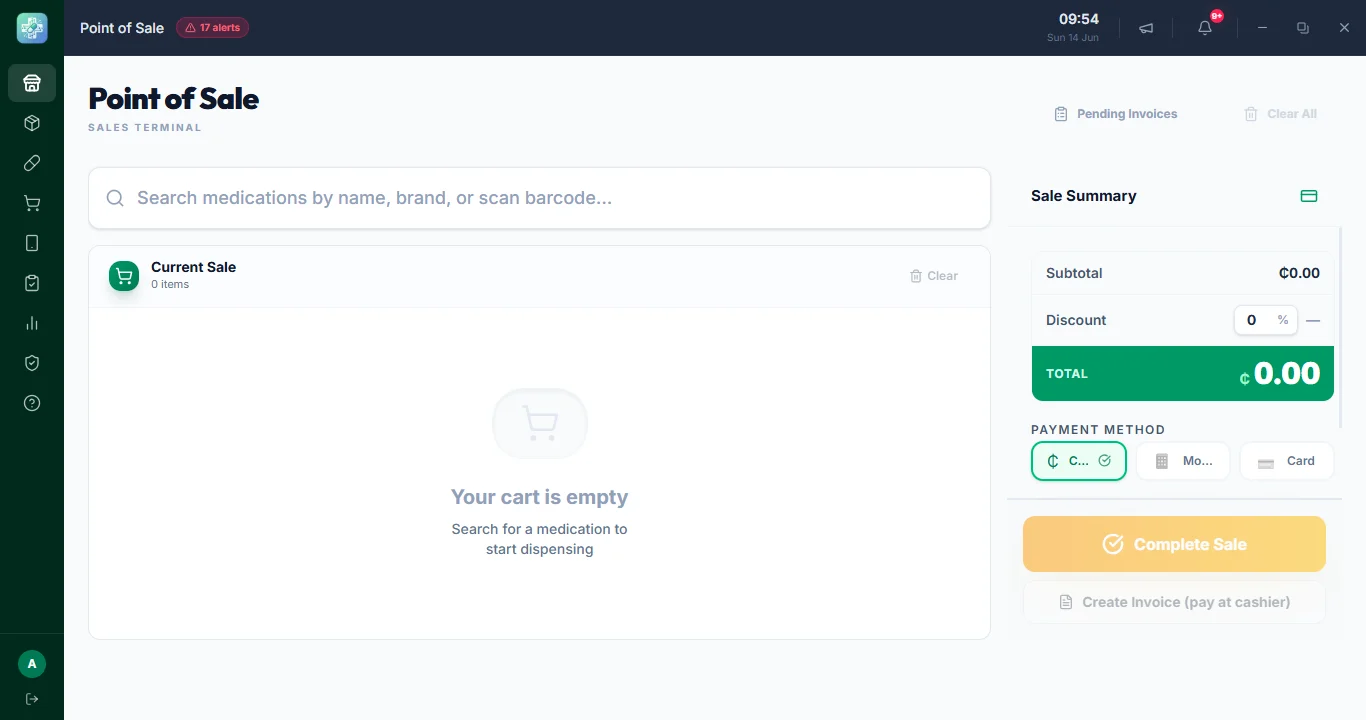
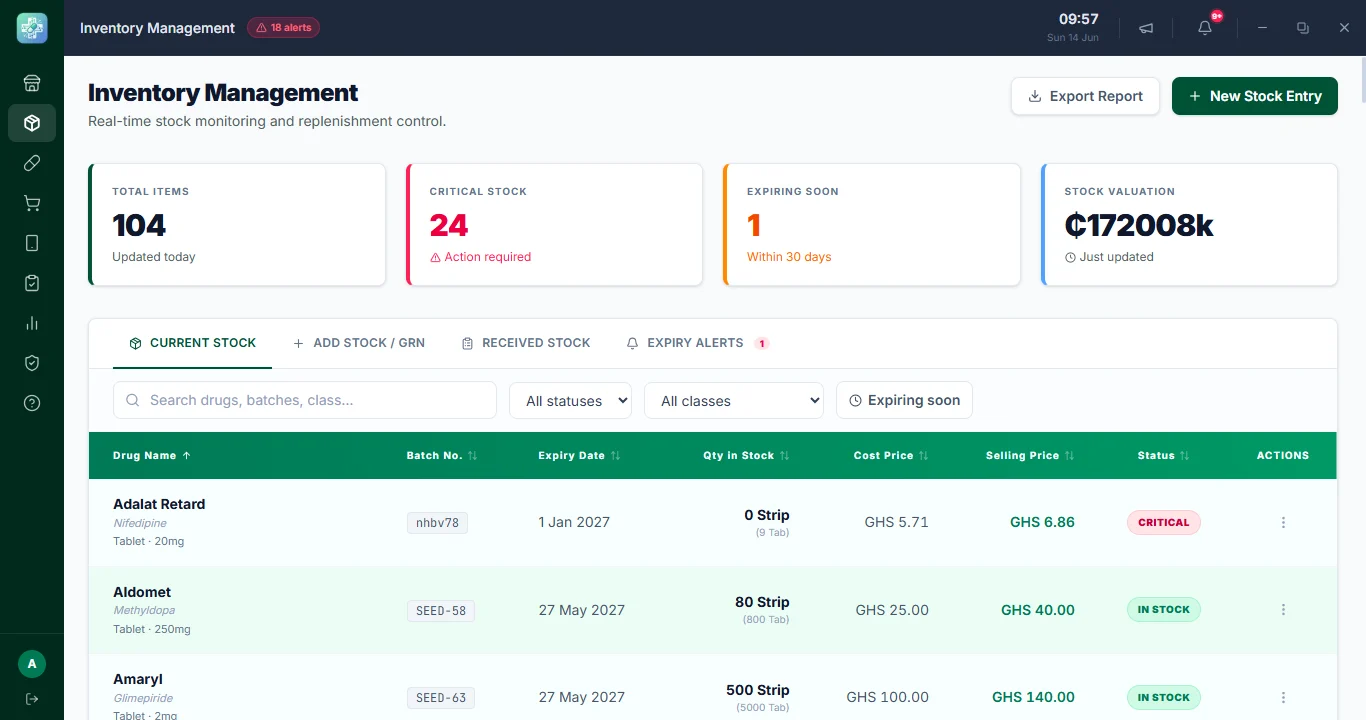
These are real screenshots from PharmaCare. Choose a tab to see each part of the app.
A quick checkout at the counter.
Search or scan an item, take cash, MoMo or card, and print a receipt. Each sale is deducted from the correct batch.
- Keyboard shortcuts for checkout
- Cash, MoMo and card
- Printed receipts
A working day
Where PharmaCare fits in a typical day.
PharmaCare was designed around the way pharmacies work. This is how a typical day might use it.
 08:00
08:00Before opening.
Check alerts, yesterday’s figures, low stock and approaching expiries before the first customer arrives.
- 11:40
Serve customers.
Search for an item, take payment and print a receipt. Stock is updated with every sale.
 16:15
16:15Receive deliveries and count stock.
Record batches and invoices, count shelves from a phone, and send differences for review.
- 21:00
Review the day.
Check sales, shifts and staff activity, and note anything that needs attention tomorrow.
Features
What PharmaCare does.
All of these work from the same database, so a sale shows up in stock levels and reports straight away.
Works offline
Selling and printing receipts do not need the internet, because the database runs on your own computers.
Shared inventory
Every counter works from the same stock figures, with batch, expiry and low-stock information.
Point of sale
A keyboard-friendly checkout for cash, MoMo and card, with printed receipts.
Drug information
Drug classes, common doses, side effects and interactions, available to dispensing staff.
Reports
See what is selling, which items are slow to move, and how sales change over time.
Staff roles
Each role gets only the screens and actions it needs, and staff activity is recorded in a log.
Web tools
Tools that work on a phone.
Three web tools work alongside the desktop app. Staff sign in to the pharmacy portal and the offline register with their usual PharmaCare username and password.
Owners, pharmacists & staff
Pharmacy portal
Sales and analytics, stock alerts, a web till and stock counts on any device. Everyone sees what their role allows.
Sign in to the portalCashiers & dispensers
Offline register
Keep selling on a phone or laptop when the main computer is off or the power is out. Sales upload when the connection returns.
Open the registerOwners & administrators
License check
Check your license type, expiry date and last check-in with your pharmacy name and registration number. No password needed.
Check a license
Setting one up for the first time? Read the step-by-step answers.

Setup and support
We install it and train your staff.
We import your drug list, install the software and train your staff before you start. This is what happens after you book.
- Walkthrough
We learn how your pharmacy works, show you the app and answer the practical questions.
- Setup and data
We install PharmaCare, import your drug list and set up users, receipts, printing and backups.
- Training and go-live
Your team practises on their own screens before you switch over, and we remain available for support afterwards.
Our team
The people behind PharmaCare.
We are a small team based in Ghana. We build PharmaCare, install it in pharmacies and provide support after go-live.

Ohemaa Appiatu Christabel
Product Manager

Elvis Ofori Nkrumah
Senior Developer

Fiagbor Fred
CTO
Pricing
Each pharmacy gets its own quote.
The price depends on your number of branches, computers and staff, and the support you need.
Every setup includes
- Installation on your computers
- Drug-list import
- Users, receipts, printing and backups set up
- Staff training before go-live
- Support from the team that builds it
Before you decide
Common questions.
Questions pharmacy owners often ask before a walkthrough. The Help centre covers more, including setup, the offline register, the stock-count portal and sign-in problems.
Visit the Help centreYes. The core system runs on your own computers with a local database, so staff keep selling, dispensing and printing receipts. Online services pick up again when the connection returns.
Yes. One computer acts as the server and holds the pharmacy database; the other counters connect to it over your local network, so every station sells from the same stock. Smaller pharmacies can run a single standalone computer.
Yes. We install the system, import your drug list, set up users, receipts, printing and backups, and train your team before you go live.
Administrators assign roles and permissions, so pharmacists, dispensers, cashiers and other staff only see the screens and actions their job needs. Actions are recorded in an activity trail.
Pricing depends on your branches, computers, staff and support needs, so we quote after a short walkthrough rather than forcing you into a fixed tier. Trial, monthly and annual licenses are available.
A web app for staff phones and laptops, at /pwa. When the main computer is off or unreachable, staff can keep ringing up sales from the stock saved on their device. Sales wait on the phone and upload automatically, then appear under Pending Offline Sales in the desktop app for approval before they touch your stock records.
Contact us
Book a walkthrough.
Tell us about your pharmacy. We will show you the app, answer your questions and prepare a quote.
- Emailapexpharmacy62@gmail.com
- WhatsApp+233508731847
Direct support. You deal with the people who build the software.